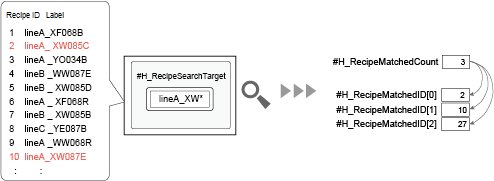
Using system variables, you can specify text to search, run searches, and check the search results.
When you search for an enhanced recipe label, the number of recipes matching your search condition and their corresponding IDs are stored in system variables. This gives you more flexibility in creating screens, as you can search without using dedicated enhanced recipe parts.
Setup Procedure
To search for enhanced recipes using system variables, use the following system variables.
Variable name |
Description |
Variable Type |
Feature |
#H_RecipeSearchTarget |
Enhanced recipe labels to search |
64 bytes of consecutive data |
Control |
#H_RecipeSearchOption |
Search options for enhanced recipes |
16-bit integer variable |
|
#H_RecipeControlSearch |
Search enhanced recipes |
Bit variable |
|
#H_RecipeResultSearch |
Search status |
16-bit integer variable |
Status
|
#H_RecipeMatchedCount |
Number of hits |
16-bit integer variable |
|
#H_RecipeMatchedID[xx] |
Matching enhanced recipe IDs found in search |
16-bit integer variable array |
Operating Procedure
Specify the recipe label to find in #H_RecipeSearchTarget. You can use wildcards "*" and "?".
For example, "lineA_XW*"

When there are two or more label languages, search uses the language current at the time of the search. Define the search text string in that language's character code.
Use #H_RecipeSearchOption to specify the search option.
Turn ON #H_RecipeControlSearch to start the enhanced recipe search. When the search process starts, bit 0 of #H_RecipeResultSearch turns ON.
When the search is complete, the #H_RecipeResultSearch bit 1 turns ON. #H_RecipeMatchedCount. Use this variable to see how many enhanced recipes matched the search condition. Starting at #H_RecipeMatchedID[0], you can find the IDs of enhanced recipes that matched the search condition.
For example, when #H_RecipeMatchedCount is 10, the values of #H_RecipeMatchedID[0] to #H_RecipeMatchedID[9] are the IDs of enhanced recipes found by the search.
#H_RecipeResultSearch bit 1. Use this variable to check if the search is complete, then turn OFF #H_RecipeControlSearch.
When you turn OFF #H_RecipeControlSearch, #H_RecipeResultSearch bit 1 also turns OFF.