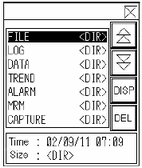
File Manager on the Display Unit
The [File Manager] displays the contents of the root folder on external storage.
Display Area
Lists the folder names and file names in external storage.
The files display in the order in which they were created. You can sort and display data in order of date. You cannot sort data by file names or time stamp. 26.9.3.2 File Manager - Extended

The name of the file created using your computer in external storage is displayed with capital letters on the display unit, even if the name uses lowercase characters. However, if the files are saved to external storage from the FTP server, uppercase and lowercase letters are distinguished on the display unit. This also applies to folder names.
Up to 19 characters in file names can be displayed. If a name uses more than 19 characters, the first 16 characters will be displayed and the rest will be shown as "...".
Up to 14 characters in folder names can be displayed. If a name uses more than 14 characters, the first 11 characters will be displayed and the rest will be shown as "...".
If you use a model that supports SD Cards, "CF" and "CF Card" are replaced by "SD" and "SD Card".
Information
When you select a folder, the folder creation date displays. Selecting a file displays its creation date and file size.
For files that exceed the following, the file size value is displayed as "**********" on the File Manager. To display properly in [File Manager], file sizes must fall within [Action Mode] and [Target Data] settings.
File Manager Settings |
Action Mode |
||
File Operation |
Select Movie |
||
Target Data |
CF |
4 GB |
4 GB |
FTP |
- |
4 GB |
|
USB storage |
4 GB |
- |
|
CF<-->FTP |
100 MB |
- |
|
CF/FTP |
- |
4 GB |
|
CF<-->USB Storage |
100 MB |
- |
|
USB storage<-->FTP |
100 MB |
- |
|
CSV Display on the Display Unit
You can use the Special Data Display [Show CSV] to display all CSV data (such as alarm history data and sampling data) created on the display unit. The [Show CSV] display works with its exclusive scroll buttons Scroll Up, Scroll Down, Scroll Left, Scroll Right.
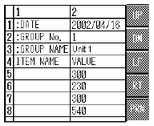
You can enter a maximum of 100 characters in each cell.
Each cell displays as text. The display is fixed as left-aligned.
Character codes in the CSV file uses the native character code only. (For Japanese, this is Shift-JIS. Western European languages display using CodePage 1252.)
Please refer to the following for your local character codes.
6.2.4 Supported Character Codes - Stroke Font/Standard Font
The outer borders are 2-dot lines, and the inner borders are 1-dot lines. Two-dot spaces are left between the borders that separate the cells and the data in the cells.
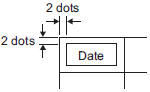
The height of the cell is adjusted depending on the font size.
The width of each cell adjusts depending on the text width. When the number of characters is five or less, the width is set to five characters.