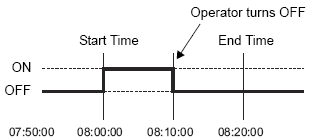
You can set up a maximum 32 operations in the Time Schedule.
The Time Schedule features are one time actions. When the Start Time is reached, the designated device address is written to just once. The write action is not repeated.
Mode: Bit Set
Start Time: 08:00:00
End Time: 08:20:00
Write Start/End Value (for the address setting), and the Prohibit Action Bit monitoring are read only once, at the beginning of the Time Schedule. Since regular readout is not possible, there may be a slight data communication delay that causes a slight delay in the Start Time.
If you change the clock settings on the display unit, the scheduler checks in ascending order for operations where the current time is within the Start Time and End Time range.
If the changed time is within range of scheduled operations, the Time Schedule runs the start action. If the time is out of range, the Time Schedule runs the end action.
Also, if multiple scheduled operations use the same [Action Address], they will run as follows.
Time Schedule Setting
|
Schedule Number |
Start Time |
End Time |
Action Mode |
Action Address |
|---|---|---|---|---|
|
1 |
1:00 |
2:00 |
Bit Set |
D0100 |
|
2 |
5:00 |
6:00 |
Current Time: 1:30
After Changing the Time: 1:40
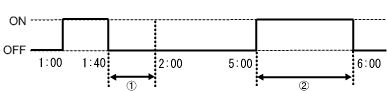
1. Schedule Number 1 is within range, however Schedule Number 2 is out of range. As a result, the end action will run.
2. When the Schedule Number 2 Start Time passes, the start action will run again.
However, if a schedule does not have Termination Action settings, the set up function will not run as it does not recognize a scheduled time range.
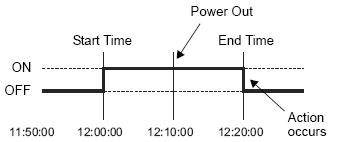
If the Start Time Action is completed and then a power outage occurs, the range is recognized and the End Action is performed at the End Time.
Action Mode: Bit Set
Start Time: 12:00:00 PM
End Time: 12:20:00 PM
When the same Start Times and End Times appear in multiple schedules, they are handled in order, starting from the smallest schedule number.
When the Time Set are specified as Address, only the control address's data is read regularly.
When there are multiple schedules with Time Set specified as Address, there may be an effect on the display unit's actions because each schedule's control address is read regularly.
When the Time Set are specified as Address, control address' readout speed is once every 500ms.
When the Control Address bit 00 (Time Acquisition Request Bit) turns ON, a delay of up to 500ms may occur before the Status Address and onwards data is read out space.
Also, when multiple schedules are set, if multiple control address' bit 00 (Time Acquisition Request Bits) simultaneously turn ON, delay may occur before an action is performed.
When the Time Set are specified as Address and you specify a Start Time or End Time that is outside the value range, the times may not function properly. Also, BCD input cannot be used.