
When Camera-Viewer EX records a video, the video is stored using the above file and folder structure.
In Camera-Viever EX, you can play back consecutive videos in the order that they were recorded.
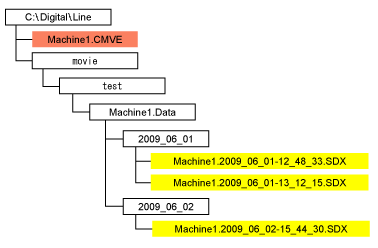
For consecutive playback of video files, files and folder names should be structured as follows:
Video files should be named "***.<Year_Month_Date>-<Hours_Minutes_Seconds>.SDX".
(<Year_Month_Date> and <Hours_Minutes_Seconds> indicates the recording date and time.)
Video files are stored in the [<Year_Month_Date>] folder.
(<Year_Month_Date> indicates the recording date.)
All "<Year_Month_Date>" folders are located in the same folder.
When Camera-Viewer EX records a video, the video is stored using the above file and folder structure.
Example:
When video files are saved using the example file and folder structure below, video files are played back in the following order.
(1) Machine1.2009_06_01-12_48_33.SDX
(2) Machine1.2009_06_01-13_12_15.SDX
(3) Machine1.2009_06_02-15_44_30.SDX
Consecutive video playback ends when all the video files have completed.

If you change the file names or folder structure of video files, consecutive playback of video files may not work properly. Camera-Viewer EX determines playback order through video file and folder names.
While the following dialog boxes are open, consecutive playback of video files does not work.
[Properties] dialog box
[Off Timer settings] dialog box
[Properties] dialog box